
3024 字
15 分钟
部分美化配置

简单美化效果预览
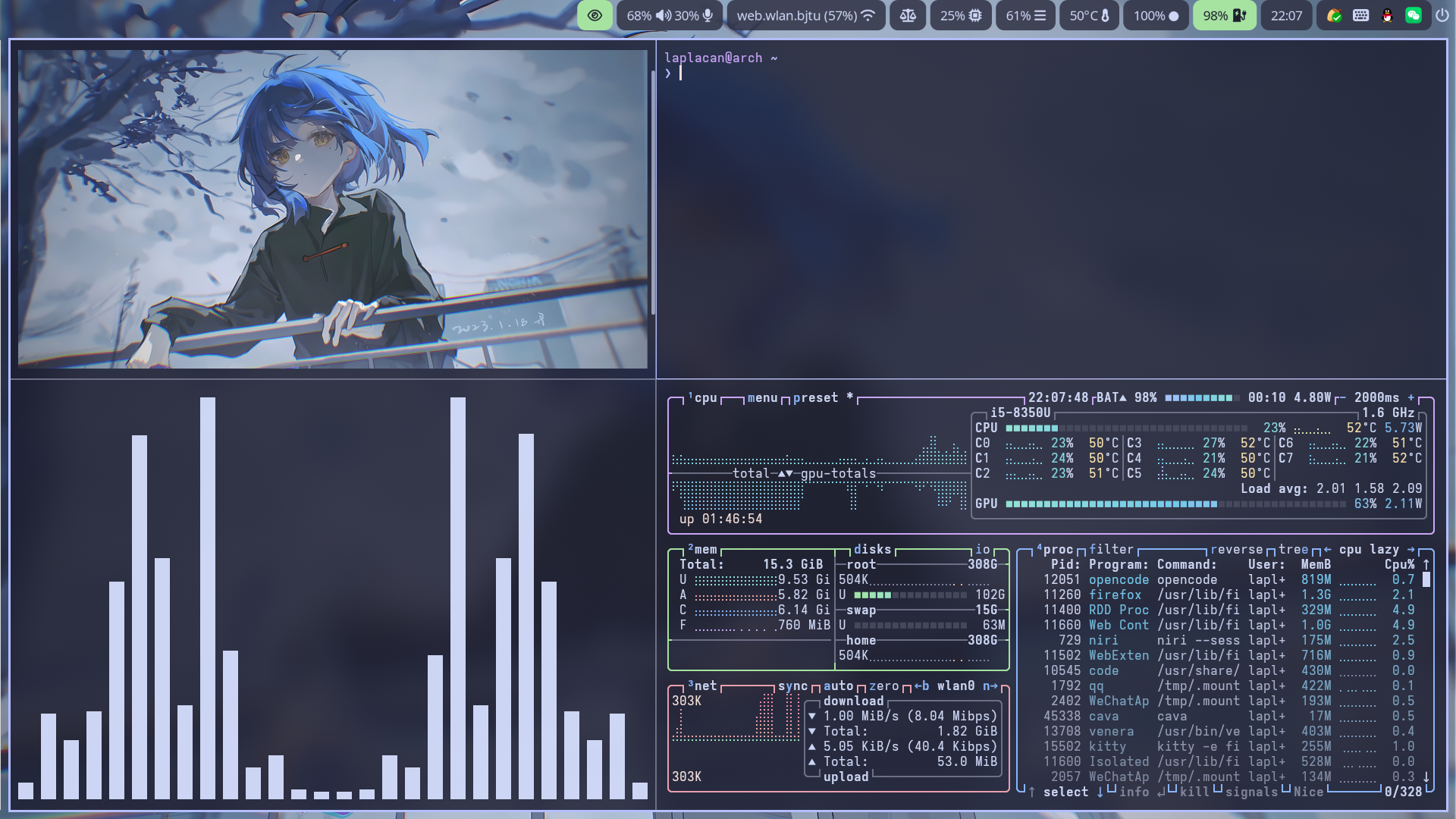
niri 配置
~/.config/niri/config.kdl
input { keyboard { xkb { } numlock }
touchpad { tap natural-scroll }
mouse { accel-profile "flat" }
trackpoint { }
warp-mouse-to-focus
focus-follows-mouse max-scroll-amount="50%"}
output "eDP-1"{
mode "1920x1080@60"
scale 1.33
position x=0 y=0
focus-at-startup}
output "HDMI-A-1" {
mode "1920x1080@60"
scale 1
position x=1444 y=0}
output "HDMI-A-2" {
mode "1920x1080@60"
scale 1
position x=1444 y=0}
layout { gaps 10
center-focused-column "never"
preset-column-widths { proportion 0.33333 proportion 0.5 proportion 0.66667 }
default-column-width {}
focus-ring { width 2
active-color "#b4befe"
inactive-color "#45475a" }
shadow { softness 30
spread 5
offset x=0 y=5
color "#0007" }
struts { }}
spawn-at-startup "waybar"spawn-at-startup "/usr/lib/polkit-gnome/polkit-gnome-authentication-agent-1"spawn-at-startup "mako"spawn-at-startup "nutstore"spawn-at-startup "fcitx5" "-d"spawn-at-startup "~/.config/niri/scripts/swayidle.sh"spawn-at-startup "wl-paste" "--watch" "cliphist" "store"spawn-at-startup "awww-daemon"
hotkey-overlay { skip-at-startup}
prefer-no-csd
screenshot-path "~/Pictures/Screenshots/Screenshot from %Y-%m-%d %H-%M-%S.png"
animations {}
window-rule { match app-id=r#"^org\.wezfurlong\.wezterm$"# default-column-width {}}
window-rule { match app-id=r#"firefox$"# title="^Picture-in-Picture$" open-floating true}
window-rule { clip-to-geometry true opacity 0.99 draw-border-with-background false}
binds { Mod+Shift+Slash { show-hotkey-overlay; }
Mod+F1 { spawn-sh "pkill fcitx5 || fcitx5"; } Mod+E { spawn "nautilus"; } Mod+Alt+V { spawn-sh "kitty --override close_on_child_death=yes -e bash ~/xxx/wl.sh"; } Mod+F12 {spawn-sh "pkill waybar || true && waybar"; } Mod+Alt+S { spawn-sh "bash ~/xxx/lock-and-sleep.sh"; }
Mod+T hotkey-overlay-title="Open a Terminal: kitty" { spawn "kitty" "-e" "fish"; } // Mod+T hotkey-overlay-title="Open a Terminal: alacritty" { spawn "alacritty"; } Mod+D hotkey-overlay-title="Run an Application: fuzzel" { spawn "fuzzel"; } Super+Alt+L hotkey-overlay-title="Lock the Screen: swaylock" { spawn "swaylock"; }
Super+Alt+S allow-when-locked=true hotkey-overlay-title=null { spawn-sh "pkill orca || exec orca"; }
XF86AudioRaiseVolume allow-when-locked=true { spawn-sh "wpctl set-volume @DEFAULT_AUDIO_SINK@ 0.1+ -l 1.0"; } XF86AudioLowerVolume allow-when-locked=true { spawn-sh "wpctl set-volume @DEFAULT_AUDIO_SINK@ 0.1-"; } XF86AudioMute allow-when-locked=true { spawn-sh "wpctl set-mute @DEFAULT_AUDIO_SINK@ toggle"; } XF86AudioMicMute allow-when-locked=true { spawn-sh "wpctl set-mute @DEFAULT_AUDIO_SOURCE@ toggle"; }
XF86AudioPlay allow-when-locked=true { spawn-sh "playerctl play-pause"; } XF86AudioStop allow-when-locked=true { spawn-sh "playerctl stop"; } XF86AudioPrev allow-when-locked=true { spawn-sh "playerctl previous"; } XF86AudioNext allow-when-locked=true { spawn-sh "playerctl next"; }
XF86MonBrightnessUp allow-when-locked=true { spawn "brightnessctl" "--class=backlight" "set" "+10%"; } XF86MonBrightnessDown allow-when-locked=true { spawn "brightnessctl" "--class=backlight" "set" "10%-"; }
Mod+O repeat=false { toggle-overview; }
Mod+Q repeat=false { close-window; }
Mod+Left { focus-column-left; } Mod+Down { focus-window-down; } Mod+Up { focus-window-up; } Mod+Right { focus-column-right; } Mod+H { focus-column-left; } Mod+J { focus-window-down; } Mod+K { focus-window-up; } Mod+L { focus-column-right; }
Mod+Ctrl+Left { move-column-left; } Mod+Ctrl+Down { move-window-down; } Mod+Ctrl+Up { move-window-up; } Mod+Ctrl+Right { move-column-right; } Mod+Ctrl+H { move-column-left; } Mod+Ctrl+J { move-window-down; } Mod+Ctrl+K { move-window-up; } Mod+Ctrl+L { move-column-right; }
Mod+Home { focus-column-first; } Mod+End { focus-column-last; } Mod+Ctrl+Home { move-column-to-first; } Mod+Ctrl+End { move-column-to-last; }
Mod+Shift+Left { focus-monitor-left; } Mod+Shift+Down { focus-monitor-down; } Mod+Shift+Up { focus-monitor-up; } Mod+Shift+Right { focus-monitor-right; } Mod+Shift+H { focus-monitor-left; } Mod+Shift+J { focus-monitor-down; } Mod+Shift+K { focus-monitor-up; } Mod+Shift+L { focus-monitor-right; }
Mod+Shift+Ctrl+Left { move-column-to-monitor-left; } Mod+Shift+Ctrl+Down { move-column-to-monitor-down; } Mod+Shift+Ctrl+Up { move-column-to-monitor-up; } Mod+Shift+Ctrl+Right { move-column-to-monitor-right; } Mod+Shift+Ctrl+H { move-column-to-monitor-left; } Mod+Shift+Ctrl+J { move-column-to-monitor-down; } Mod+Shift+Ctrl+K { move-column-to-monitor-up; } Mod+Shift+Ctrl+L { move-column-to-monitor-right; }
Mod+Page_Down { focus-workspace-down; } Mod+Page_Up { focus-workspace-up; } Mod+U { focus-workspace-down; } Mod+I { focus-workspace-up; } Mod+Ctrl+Page_Down { move-column-to-workspace-down; } Mod+Ctrl+Page_Up { move-column-to-workspace-up; } Mod+Ctrl+U { move-column-to-workspace-down; } Mod+Ctrl+I { move-column-to-workspace-up; }
Mod+Shift+Page_Down { move-workspace-down; } Mod+Shift+Page_Up { move-workspace-up; } Mod+Shift+U { move-workspace-down; } Mod+Shift+I { move-workspace-up; }
Mod+WheelScrollDown cooldown-ms=150 { focus-workspace-down; } Mod+WheelScrollUp cooldown-ms=150 { focus-workspace-up; } Mod+Ctrl+WheelScrollDown cooldown-ms=150 { move-column-to-workspace-down; } Mod+Ctrl+WheelScrollUp cooldown-ms=150 { move-column-to-workspace-up; }
Mod+WheelScrollRight { focus-column-right; } Mod+WheelScrollLeft { focus-column-left; } Mod+Ctrl+WheelScrollRight { move-column-right; } Mod+Ctrl+WheelScrollLeft { move-column-left; }
Mod+Shift+WheelScrollDown { focus-column-right; } Mod+Shift+WheelScrollUp { focus-column-left; } Mod+Ctrl+Shift+WheelScrollDown { move-column-right; } Mod+Ctrl+Shift+WheelScrollUp { move-column-left; }
Mod+1 { focus-workspace 1; } Mod+2 { focus-workspace 2; } Mod+3 { focus-workspace 3; } Mod+4 { focus-workspace 4; } Mod+5 { focus-workspace 5; } Mod+6 { focus-workspace 6; } Mod+7 { focus-workspace 7; } Mod+8 { focus-workspace 8; } Mod+9 { focus-workspace 9; } Mod+Ctrl+1 { move-column-to-workspace 1; } Mod+Ctrl+2 { move-column-to-workspace 2; } Mod+Ctrl+3 { move-column-to-workspace 3; } Mod+Ctrl+4 { move-column-to-workspace 4; } Mod+Ctrl+5 { move-column-to-workspace 5; } Mod+Ctrl+6 { move-column-to-workspace 6; } Mod+Ctrl+7 { move-column-to-workspace 7; } Mod+Ctrl+8 { move-column-to-workspace 8; } Mod+Ctrl+9 { move-column-to-workspace 9; }
Mod+BracketLeft { consume-or-expel-window-left; } Mod+BracketRight { consume-or-expel-window-right; }
Mod+Comma { consume-window-into-column; } Mod+Period { expel-window-from-column; }
Mod+R { switch-preset-column-width; } Mod+Shift+R { switch-preset-window-height; } Mod+Ctrl+R { reset-window-height; } Mod+F { maximize-column; } Mod+Shift+F { fullscreen-window; }
Mod+Ctrl+F { expand-column-to-available-width; }
Mod+C { center-column; }
Mod+Ctrl+C { center-visible-columns; }
Mod+Minus { set-column-width "-10%"; } Mod+Equal { set-column-width "+10%"; }
Mod+Shift+Minus { set-window-height "-10%"; } Mod+Shift+Equal { set-window-height "+10%"; }
Mod+V { toggle-window-floating; } Mod+Shift+V { switch-focus-between-floating-and-tiling; }
Mod+W { toggle-column-tabbed-display; }
Print { screenshot; } Ctrl+Print { screenshot-screen; } Alt+Print { screenshot-window; }
Mod+Escape allow-inhibiting=false { toggle-keyboard-shortcuts-inhibit; }
Mod+Shift+E { quit; } Ctrl+Alt+Delete { quit; }
Mod+Shift+P { power-off-monitors; }
Mod+P { spawn-sh "state=$(niri msg outputs | grep -c 'HDMI-A-.* connected'); if [ \"$state\" -gt 0 ]; then niri msg output 'HDMI-A-1' off 2>/dev/null; niri msg output 'HDMI-A-2' off 2>/dev/null; else niri msg output 'HDMI-A-1' on 2>/dev/null; niri msg output 'HDMI-A-2' on 2>/dev/null; fi"; }}
environment { LANG "zh_CN.UTF-8" LC_CTYPE "en_US.UTF-8" // XMODIFIERS "@im=fcitx"}
cursor { xcursor-theme "breeze_cursors"
xcursor-size 20
hide-after-inactive-ms 15000}swayidle.sh
#!/usr/bin/env bash
swayidle -w \ timeout 300 'swaylock -f' \ timeout 600 'niri msg action power-off-monitors' \ resume 'niri msg action power-off-monitors' \ timeout 1200 'systemctl suspend' \lock-and-sleep.sh
systemctl suspend && swaylockwl.sh
cliphist list | fzf | cliphist decode | wl-copyfish 配置
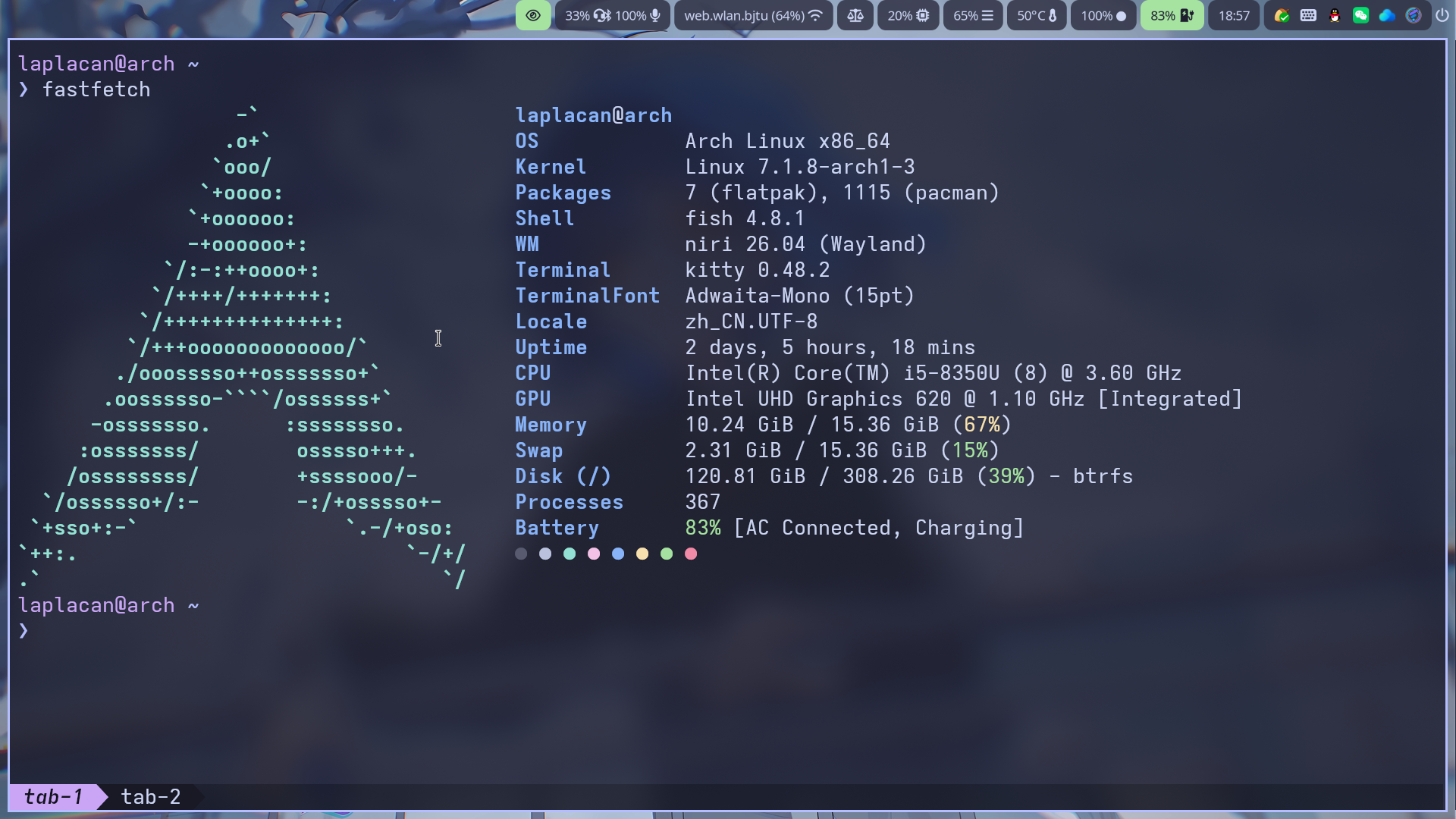
~/.config/fish/config.fish
if status is-interactive# Commands to run in interactive sessions can go hereendset fish_greeting ""# set -g fish_color_user "#cba6f7"set -g fish_color_cwd "#b4befe"# set -g fish_color_cwd "#f9e2af"
set -U fish_prompt_pwd_dir_length 0~/.config/fish/functions/fish_prompt.fish
function fish_prompt set -l last_status $status
# user@host 低饱和块(原 mauve 块替换) # set_color -b 45475a # surface1 灰紫底(低饱和) # set_color b4befe # lavender 亮字 # set_color 6c7086 # set_color 94e2d5 set_color cba6f7
# set_color -b cdd6f4 # set_color 1e1e2e
printf '%s@%s ' $USER $hostname # set_color normal # set_color cdd6f4 # 箭头与块同色(低调过渡) # printf ' ' # powerline 箭头,过渡到目录 # printf ' ' # powerline 箭头,过渡到目录 set_color normal
# 行一:目录 + git 状态(fish 内置 git prompt,零依赖) set_color $fish_color_cwd printf '%s' (prompt_pwd) printf '%s' (fish_git_prompt) set_color normal
# 行二:提示符符号(上次命令失败时变红) echo if test $last_status -eq 0 set_color b4befe else set_color f38ba8 end printf '❯ ' set_color normalendkitty 配置
运行 kitty +kitten themes 配置主题,我用的是 catppuccin-mocha。
~/.config/kitty/kitty.conf
shell fish
window_padding_width 5
hide_window_decorations yes
background_opacity 0.85
background_blur 35
font_family Adwaita Mono
font_size 15
remember_window_size no
confirm_os_window_close 0
map ctrl+shift+o send_text all \x1b[67;6u# active_border_color #b4befe# inactive_border_color #b4befe
tab_bar_style powerlineactive_tab_foreground #1e1e2eactive_tab_background #b4befeinactive_tab_foreground #cdd6f4inactive_tab_background #313244tab_title_template "{title}"
# BEGIN_KITTY_THEME# Catppuccin-Mochainclude current-theme.conf# END_KITTY_THEMEfastfetch 配置
~/.config/fastfetch/config.jsonc
{ "$schema": "https://github.com/fastfetch-cli/fastfetch/raw/dev/doc/json_schema.json", "logo": { "type": "auto", "source": "arch" }, "display": { "separator": " ", "color": { "keys": "blue", "title": "blue" }, "key": { "width": 15 } }, "modules": [ { "type": "title" }, "os", "kernel", "packages", "shell", "wm", "terminal", {"type": "terminalFont", "key": "TerminalFont"}, "locale", "uptime", "cpu", "gpu", "memory", "swap", "disk", "processes", {"type": "battery", "key": "Battery"}, "powerAdapter", {"type": "localIp", "key": "Local IP"}, { "type": "colors", "symbol": "circle" } ]}waybar 配置
~/.config/waybar/config.jsonc
// -*- mode: jsonc -*-{ // "layer": "top", // Waybar at top layer // "position": "bottom", // Waybar position (top|bottom|left|right) "height": 30, // Waybar height (to be removed for auto height) // "width": 1280, // Waybar width "spacing": 4, // Gaps between modules (4px) // Choose the order of the modules "modules-left": [ "custom/arch", // "sway/workspaces", // "sway/mode", // "sway/scratchpad", "niri/workspaces", "niri/window", "custom/media" ], "modules-center": [ "sway/window" // "niri/window" ], "modules-right": [ "mpd", "idle_inhibitor", "pulseaudio", "network", "power-profiles-daemon", "cpu", "memory", "temperature", "backlight", "keyboard-state", // "sway/language", // "niri/language", "battery", "battery#bat2", "clock", "tray", "custom/power" ], // Modules configuration "niri/workspaces": { "format": "{value}", "disable-click": false, "current-only": false, "all-outputs": false }, "niri/window": { "format": "{title}", "icon": true, "icon-size": 18 }, "custom/arch":{ "format": "\uf303", "tooltip": false, "on-click": "fuzzel" }, "keyboard-state": { "numlock": true, "capslock": true, "format": "{name} {icon}", "format-icons": { "locked": "", "unlocked": "" } }, "mpd": { "format": "{stateIcon} {consumeIcon}{randomIcon}{repeatIcon}{singleIcon}{artist} - {album} - {title} ({elapsedTime:%M:%S}/{totalTime:%M:%S}) ⸨{songPosition}|{queueLength}⸩ {volume}% ", "format-disconnected": "Disconnected ", "format-stopped": "{consumeIcon}{randomIcon}{repeatIcon}{singleIcon}Stopped ", "unknown-tag": "N/A", "interval": 5, "consume-icons": { "on": " " }, "random-icons": { "off": "<span color=\"#f53c3c\"></span> ", "on": " " }, "repeat-icons": { "on": " " }, "single-icons": { "on": "1 " }, "state-icons": { "paused": "", "playing": "" }, "tooltip-format": "MPD (connected)", "tooltip-format-disconnected": "MPD (disconnected)" }, "idle_inhibitor": { "format": "{icon}", "format-icons": { "activated": "", "deactivated": "" } }, "tray": { // "icon-size": 21, "spacing": 10 // "icons": { // "blueman": "bluetooth", // "TelegramDesktop": "$HOME/.local/share/icons/hicolor/16x16/apps/telegram.png" // } }, "clock": { // "timezone": "America/New_York", "tooltip-format": "<big>{:%Y %B}</big>\n<tt><small>{calendar}</small></tt>", "format-alt": "{:%Y-%m-%d}" }, "cpu": { "format": "{usage}% ", "tooltip": false }, "memory": { "format": "{}% " }, "temperature": { // "thermal-zone": 2, // "hwmon-path": "/sys/class/hwmon/hwmon2/temp1_input", "critical-threshold": 80, // "format-critical": "{temperatureC}°C {icon}", "format": "{temperatureC}°C {icon}", "format-icons": ["", "", ""] }, "backlight": { // "device": "acpi_video1", "format": "{percent}% {icon}", "format-icons": ["", "", "", "", "", "", "", "", ""] }, "battery": { "states": { // "good": 95, "warning": 30, "critical": 15 }, "format": "{capacity}% {icon}", "format-full": "{capacity}% {icon}", "format-charging": "{capacity}% ", "format-plugged": "{capacity}% ", "format-alt": "{time} {icon}", // "format-good": "", // An empty format will hide the module // "format-full": "", "format-icons": ["", "", "", "", ""] }, "battery#bat2": { "bat": "BAT2" }, "power-profiles-daemon": { "format": "{icon}", "tooltip-format": "Power profile: {profile}\nDriver: {driver}", "tooltip": true, "format-icons": { "default": "", "performance": "", "balanced": "", "power-saver": "" } }, "network": { // "interface": "wlp2*", // (Optional) To force the use of this interface "format-wifi": "{essid} ({signalStrength}%) ", "format-ethernet": "{ipaddr}/{cidr} ", "tooltip-format": "{ifname} via {gwaddr} ", "format-linked": "{ifname} (No IP) ", "format-disconnected": "Disconnected ⚠", "format-alt": "{ifname}: {ipaddr}/{cidr}" }, "pulseaudio": { // "scroll-step": 1, // %, can be a float "format": "{volume}% {icon} {format_source}", "format-bluetooth": "{volume}% {icon} {format_source}", "format-bluetooth-muted": " {icon} {format_source}", "format-muted": " {format_source}", "format-source": "{volume}% ", "format-source-muted": "", "format-icons": { "headphone": "", "hands-free": "", "headset": "", "phone": "", "portable": "", "car": "", "default": ["", "", ""] }, "on-click": "pavucontrol" }, "custom/media": { "format": "{icon} {text}", "return-type": "json", "max-length": 40, "format-icons": { "spotify": "", "default": "🎜" }, "escape": true, "exec": "$HOME/.config/waybar/mediaplayer.py 2> /dev/null" // Script in resources folder // "exec": "$HOME/.config/waybar/mediaplayer.py --player spotify 2> /dev/null" // Filter player based on name }, "custom/power": { "format" : "⏻ ", "tooltip": false, "menu": "on-click", "menu-file": "$HOME/.config/waybar/power_menu.xml", // Menu file in resources folder "menu-actions": { "shutdown": "shutdown", "reboot": "reboot", "suspend": "systemctl suspend", "hibernate": "systemctl hibernate" } }}~/.config/waybar/style.css
/* * Catppuccin Mocha - Glassmorphism * 基于原 style.css 结构,统一 Catppuccin Mocha 配色 + 半透明毛玻璃 */
* { /* `otf-font-awesome` is required to be installed for icons */ font-family: "Noto Sans", "Noto Sans CJK SC", "Font Awesome 7 Free", "Font Awesome 7 Brands", "Symbols Nerd Font", sans-serif; font-size: 13px;}
window#waybar { background-color: rgba(43, 48, 59, 0); color: #cdd6f4; transition-property: background-color; transition-duration: .5s;}
window#waybar.hidden { opacity: 0.2;}
window#waybar.termite { background-color: #1e1e2e;}
window#waybar.chromium { background-color: #1e1e2e; border: none;}
button { /* Use box-shadow instead of border so the text isn't offset */ box-shadow: inset 0 -3px transparent; /* Avoid rounded borders under each button name */ border: none; border-radius: 0;}
button:hover { background: rgba(137, 180, 250, 0.15); box-shadow: inset 0 -3px #89b4fa;}
#pulseaudio:hover { background-color: rgba(249, 226, 175, 0.2);}
#custom-arch { font-family: "Symbols Nerd Font", "JetBrainsMono Nerd Font", sans-serif; font-size: 17px; color: #cdd6f4; background-color: rgba(49, 50, 68, 0.85); border-radius: 8px; padding: 0 9px; margin-right: 2px;}
#workspaces { background-color: rgba(49, 50, 68, 0.85); border-radius: 8px; padding: 0 4px;}
#window { background-color: rgba(49, 50, 68, 0.85); border-radius: 8px; padding: 0 6px;}
#workspaces button { padding: 0 6px; background-color: transparent; color: #bac2de;}
#workspaces button:hover { background: rgba(137, 180, 250, 0.15);}
#workspaces button.focused, #workspaces button.active { background-color: rgba(180, 190, 254, 0.3); box-shadow: inset 0 -3px #b4befe; color: #cdd6f4;}
#workspaces button.urgent { background-color: #f38ba8; color: #1e1e2e;}
/* 空工作区变暗 */#workspaces button.empty { color: #7f849c;}
/* 没有窗口时不要留下空的标题背景 */window#waybar.empty #window { background-color: transparent;}
#mode { background-color: #45475a; box-shadow: inset 0 -3px #b4befe;}
#clock,#battery,#cpu,#memory,#disk,#temperature,#backlight,#network,#pulseaudio,#wireplumber,#custom-media,#tray,#mode,#idle_inhibitor,#scratchpad,#power-profiles-daemon,#mpd { padding: 0 10px; color: #cdd6f4; background-color: rgba(49, 50, 68, 0.85); border-radius: 8;}
#window,#workspaces { margin: 0 4px;}
/* If workspaces is the leftmost module, omit left margin */.modules-left > widget:first-child > #workspaces { margin-left: 0;}
/* If workspaces is the rightmost module, omit right margin */.modules-right > widget:last-child > #workspaces { margin-right: 0;}
#battery.charging, #battery.plugged { color: #1e1e2e; background-color: #a6e3a1;}
@keyframes blink { to { background-color: #f38ba8; color: #1e1e2e; }}
/* Using steps() instead of linear as a timing function to limit cpu usage */#battery.critical:not(.charging) { background-color: #f38ba8; color: #1e1e2e; animation-name: blink; animation-duration: 0.5s; animation-timing-function: steps(12); animation-iteration-count: infinite; animation-direction: alternate;}
#network.disconnected { background-color: #f38ba8; color: #1e1e2e;}
#wireplumber.muted { background-color: #f38ba8; color: #1e1e2e;}
#custom-media.custom-spotify { background-color: #a6e3a1; color: #1e1e2e;}
#custom-media.custom-vlc { background-color: #fab387; color: #1e1e2e;}
#temperature.critical { background-color: #f38ba8; color: #1e1e2e;}
#tray > .passive { -gtk-icon-effect: dim;}
#tray > .needs-attention { -gtk-icon-effect: highlight; background-color: #f38ba8;}
#idle_inhibitor.activated { background-color: #a6e3a1; color: #1e1e2e;}
#mpd.disconnected { background-color: #f38ba8; color: #1e1e2e;}
#mpd.stopped { background-color: #89b4fa; color: #1e1e2e;}
#mpd.paused { background-color: #cba6f7; color: #1e1e2e;}
#language { background: #94e2d5; color: #1e1e2e; padding: 0 5px; margin: 0 5px; min-width: 16px;}
#keyboard-state { background: #a6e3a1; color: #1e1e2e; padding: 0 0px; margin: 0 5px; min-width: 16px;}
#keyboard-state > label { padding: 0 5px;}
#keyboard-state > label.locked { background: rgba(0, 0, 0, 0.2);}
#scratchpad { background: rgba(49, 50, 68, 0.85);}
#scratchpad.empty { background-color: transparent;}
#privacy { padding: 0;}
#privacy-item { padding: 0 5px; color: #cdd6f4;}
#privacy-item.screenshare { background-color: #fab387; color: #1e1e2e;}
#privacy-item.audio-in { background-color: #a6e3a1; color: #1e1e2e;}
#privacy-item.audio-out { background-color: #89b4fa; color: #1e1e2e;}
tooltip { background-color: rgba(30, 30, 46, 0.95); border: 1px solid #45475a; border-radius: 8; color: #cdd6f4;}
tooltip label { color: #cdd6f4;}yazi 配置
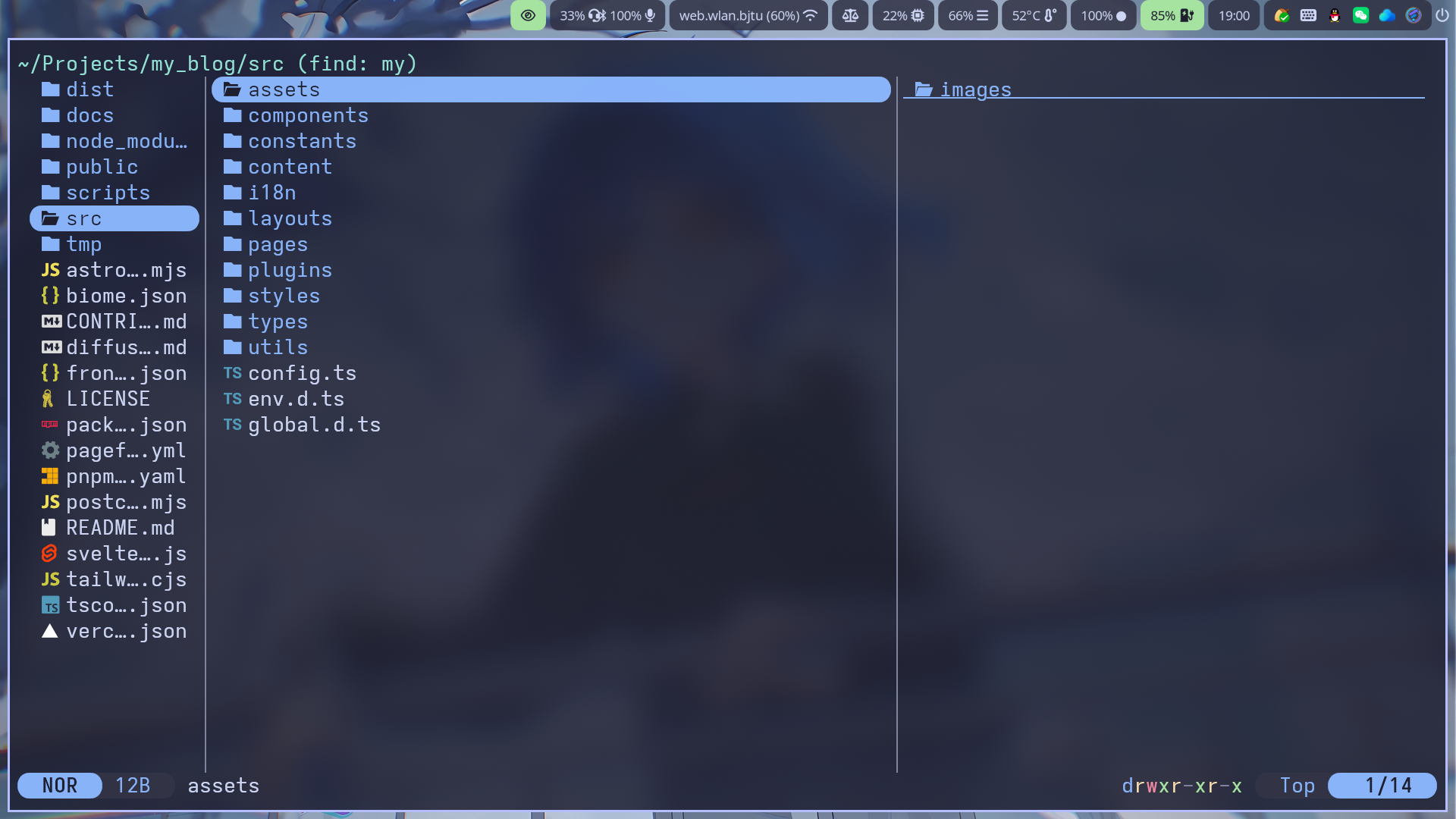
运行
ya pkg add yazi-rs/flavors:catppuccin-mocha~/.config/yazi/theme.toml
[flavor]dark = "catppuccin-mocha"swaylock 配置
screenshotsclocktimestr=%H:%Mdatestr=%A %m月%d日font=Noto Sans CJK SCindicatorindicator-radius=200indicator-thickness=15indicator-idle-visibleeffect-blur=10x5effect-vignette=0.5:0.5fade-in=0.2show-failed-attemptscolor=1e1e2einside-color=313244ccring-color=b4befeffring-ver-color=89b4faring-wrong-color=f38ba8ring-clear-color=a6e3a1key-hl-color=a6e3a1bs-hl-color=f38ba8text-color=cdd6f4line-color=00000000separator-color=00000000
text-ver-color=89b4fatext-wrong-color=f38ba8text-clear-color=a6e3a1text-caps-lock-color=f9e2afmako 配置
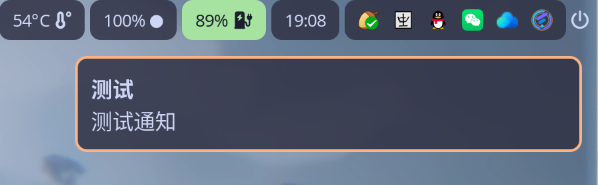
~/.config/mako/config
background-color=#313244D9text-color=#cdd6f4border-color=#fab387progress-color=#a6e3a1border-radius=8border-size=2padding=10margin=12width=380font=Noto Sans CJK SC 12default-timeout=8000btop 配置
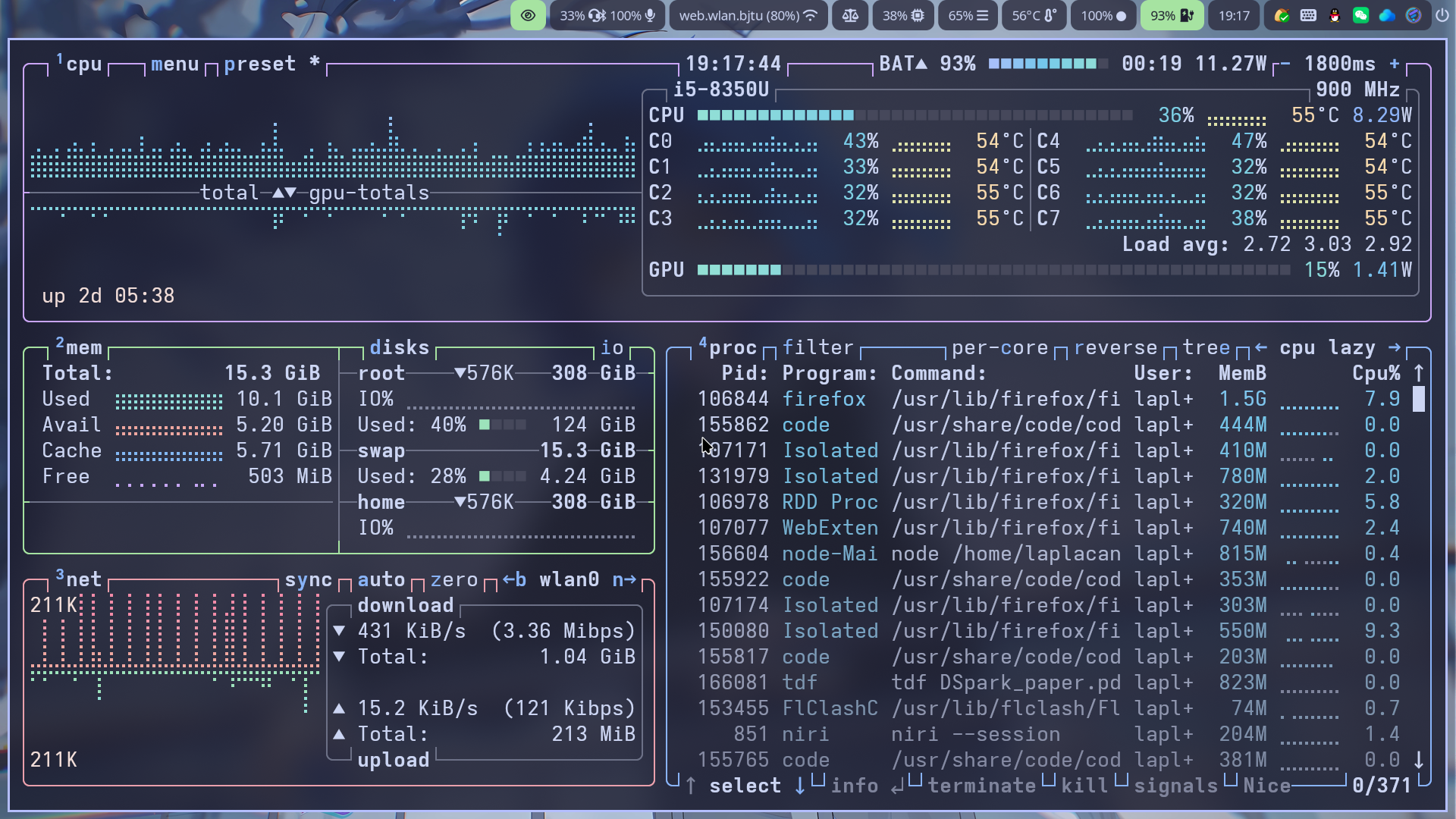
~/.config/btop/themes/catppuccin_mocha.theme
# Main background, empty for terminal default, need to be empty if you want transparent backgroundtheme[main_bg]="#1e1e2e"
# Main text colortheme[main_fg]="#cdd6f4"
# Title color for boxestheme[title]="#cdd6f4"
# Highlight color for keyboard shortcutstheme[hi_fg]="#89b4fa"
# Background color of selected item in processes boxtheme[selected_bg]="#45475a"
# Foreground color of selected item in processes boxtheme[selected_fg]="#89b4fa"
# Color of inactive/disabled texttheme[inactive_fg]="#7f849c"
# Color of text appearing on top of graphs, i.e uptime and current network graph scalingtheme[graph_text]="#f5e0dc"
# Background color of the percentage meterstheme[meter_bg]="#45475a"
# Misc colors for processes box including mini cpu graphs, details memory graph and details status texttheme[proc_misc]="#f5e0dc"
# CPU, Memory, Network, Proc box outline colorstheme[cpu_box]="#cba6f7" #Mauvetheme[mem_box]="#a6e3a1" #Greentheme[net_box]="#eba0ac" #Maroontheme[proc_box]="#89b4fa" #Blue
# Box divider line and small boxes line colortheme[div_line]="#6c7086"
# Temperature graph color (Green -> Yellow -> Red)theme[temp_start]="#a6e3a1"theme[temp_mid]="#f9e2af"theme[temp_end]="#f38ba8"
# CPU graph colors (Teal -> Lavender)theme[cpu_start]="#94e2d5"theme[cpu_mid]="#74c7ec"theme[cpu_end]="#b4befe"
# Mem/Disk free meter (Mauve -> Lavender -> Blue)theme[free_start]="#cba6f7"theme[free_mid]="#b4befe"theme[free_end]="#89b4fa"
# Mem/Disk cached meter (Sapphire -> Lavender)theme[cached_start]="#74c7ec"theme[cached_mid]="#89b4fa"theme[cached_end]="#b4befe"
# Mem/Disk available meter (Peach -> Red)theme[available_start]="#fab387"theme[available_mid]="#eba0ac"theme[available_end]="#f38ba8"
# Mem/Disk used meter (Green -> Sky)theme[used_start]="#a6e3a1"theme[used_mid]="#94e2d5"theme[used_end]="#89dceb"
# Download graph colors (Peach -> Red)theme[download_start]="#fab387"theme[download_mid]="#eba0ac"theme[download_end]="#f38ba8"
# Upload graph colors (Green -> Sky)theme[upload_start]="#a6e3a1"theme[upload_mid]="#94e2d5"theme[upload_end]="#89dceb"
# Process box color gradient for threads, mem and cpu usage (Sapphire -> Mauve)theme[process_start]="#74c7ec"theme[process_mid]="#b4befe"theme[process_end]="#cba6f7"~/.config/btop/btop.conf
color_theme = "catppuccin_mocha"theme_background = falsecava 配置
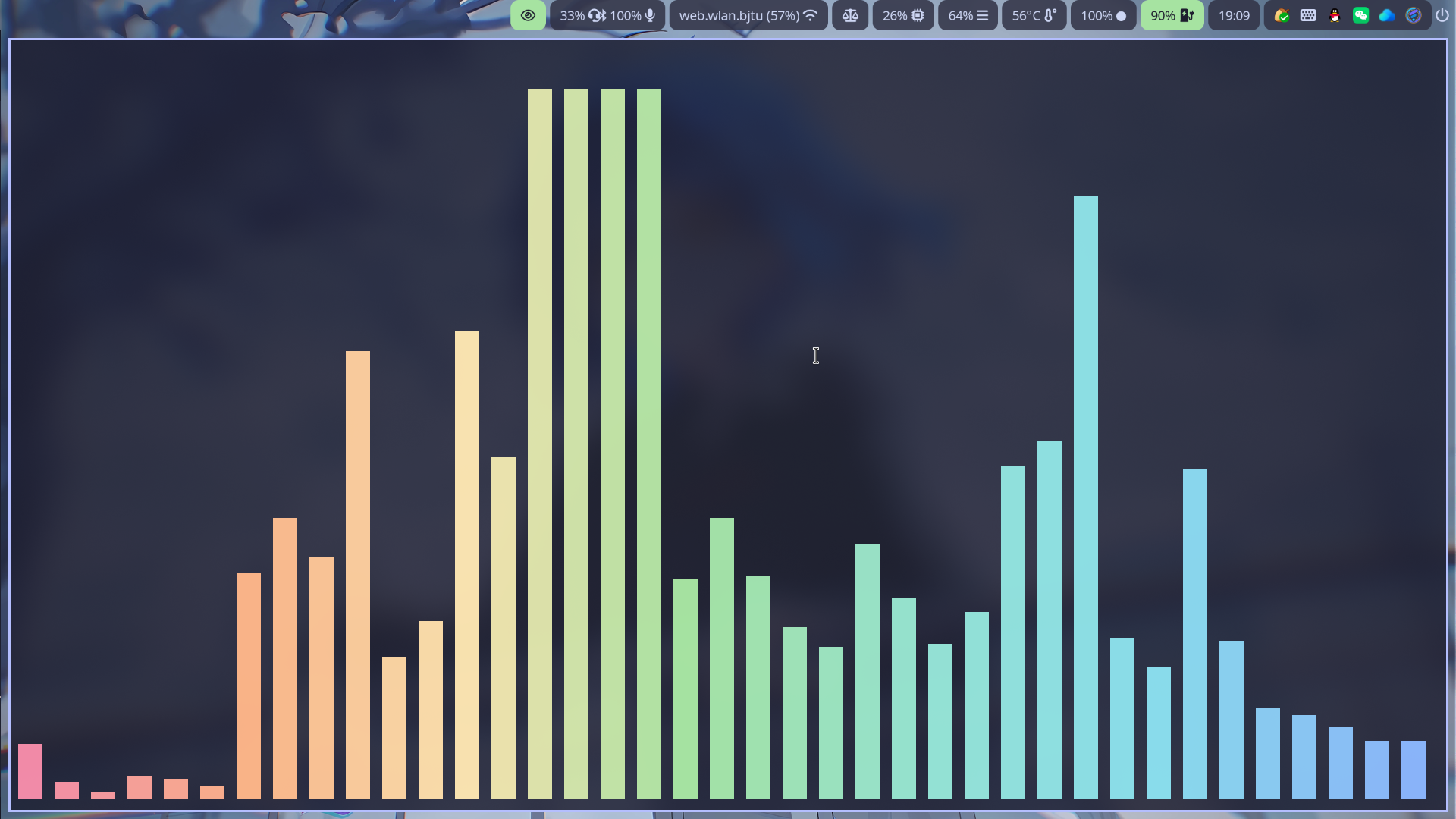
~/.config/cava/config
[general]framerate = 60autosens = 1sensitivity = 100bars = 0bar_width = 2bar_spacing = 1center_align = 1max_height = 95
[input]method = pipewiresource = autosample_rate = 44100channels = 2
[output]method = noncursesorientation = bottomchannels = monomono_option = averagesynchronized_sync = 1
[color]horizontal_gradient = 1horizontal_gradient_color_1 = '#f38ba8'horizontal_gradient_color_2 = '#fab387'horizontal_gradient_color_3 = '#f9e2af'horizontal_gradient_color_4 = '#a6e3a1'horizontal_gradient_color_5 = '#94e2d5'horizontal_gradient_color_6 = '#89dceb'horizontal_gradient_color_7 = '#89b4fa'horizontal_gradient_color_8 = '#cba6f7'
[smoothing]; monstercat = 1; waves = 1; noise_reduction = 60
[eq]1 = 12 = 13 = 14 = 15 = 1~/.config/cava/themes/catppuccin_mocha
[color]gradient = 1gradient_color_1 = '#f38ba8'gradient_color_2 = '#fab387'gradient_color_3 = '#f9e2af'gradient_color_4 = '#a6e3a1'gradient_color_5 = '#94e2d5'gradient_color_6 = '#89dceb'gradient_color_7 = '#89b4fa'gradient_color_8 = '#cba6f7'fuzzel 配置
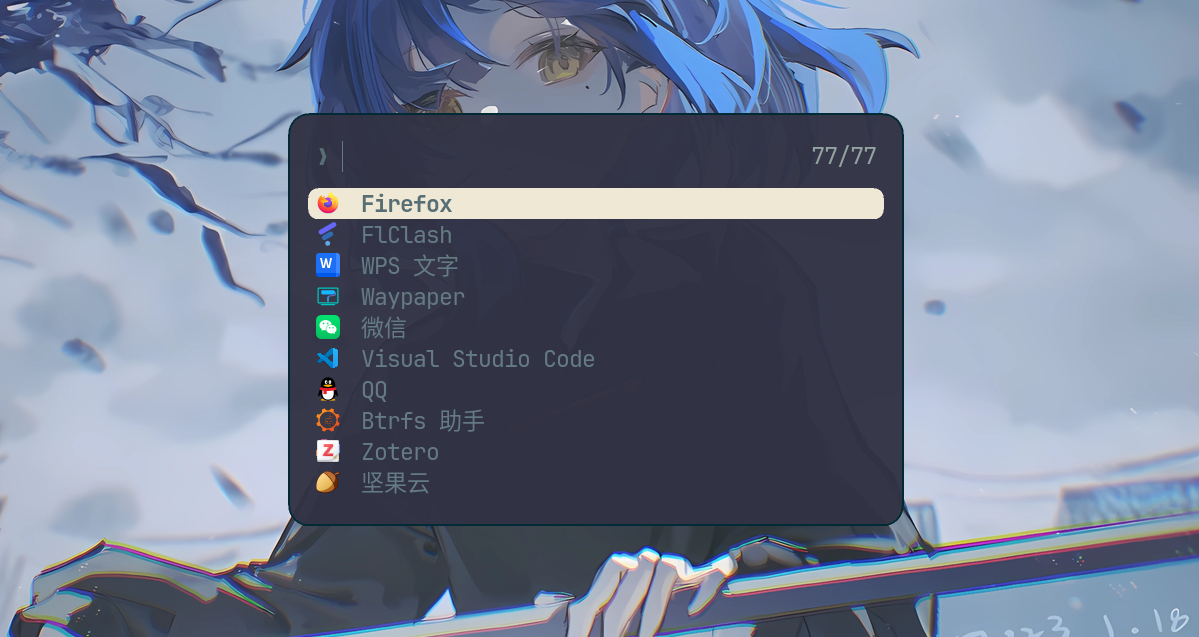
~/.config/fuzzel/fuzzel.ini
# Catppuccin Mocha
font=JetBrainsMono Nerd Font:size=13, Noto Sans CJK SC:size=13dpi-aware=autouse-bold=yesterminal=kitty -e
width=40lines=10horizontal-pad=20vertical-pad=20inner-pad=12prompt="❯ "match-counter=yesicon-theme=Breeze_Light
[colors]background=313244F5text=e8e9f4prompt=f5c2e7placeholder=6c7086input=e8e9f4match=f9e2afselection=585b70selection-text=e8e9f4selection-match=f9e2afcounter=a6adc8border=f5c2e7
[border]width=2radius=16selection-radius=8一些有趣的工具
gping 把 ping 变成彩色实时折线图
lazygit 终端里的 Git 可视化工具
chafa 终端看图(kitty +kitten icat 也可以看图)
mpv + yt-dlp 终端里播放音乐
mpv --no-video "URL"mpv --no-video --demuxer-max-bytes=4MiB --demuxer-readahead-secs=20 --msg-level=ffmpeg=fatal "URL"mpv --no-video --shuffle links.txtyt-dlp -f ba -g "URL"yt-dlp -f ba -x --audio-format mp3 -o "~/Music/%(title)s.%(ext)s" "URL"mpv --no-video --ytdl-raw-options="cookies-from-browser=[chrome, firefox]" "URL"tdf 在终端中查看 PDF
- Vim 方向键翻页
f全屏z填充,使用H/J/K/L移动,使用o/O放大/缩小i反色

 鲁公网安备37160202001015号